The Ramp simulator is great for demonstrating Proportional, Integral, and Derivative (PID). A signal generator with a ramping function is connected to the controller’s input giving you full control of the process variable (PV). You can step the controller’s input up or down by any increment or ramp it up or down at any specified rate. These functions will fully demonstrate the characteristics of a PID controller. An example follows.
Right click here and open the simulator in a new tab or window. Configure the Controller Characteristics as depicted in the following figure. Note: a direct acting controller responds to an increasing input by increasing its output. Conversely, a reverse acting controller responds to an increasing input by decreasing its output.
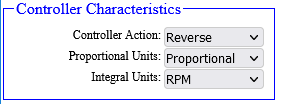
The P in PID stands for Proportional. A controller manufacturer can implement it in one of two ways, as Proportional Band or as Gain. We will begin by examining Proportional Band and then make the simple transition to Gain. Proportional Band is usually expressed in percent. It represents the amount the process variable (PV) or set point (SP) must change to cause the controller’s output (OP) to change 100%. To demonstrate, note that P is set to 100, and put the controller in Automatic by clicking the "A/M" button. Notice the control algorithm sets the setpoint (SP) equal to the process variable (PV). That action is a feature of some controllers called bumpless transfer. It prevents the output (OP) from changing during a mode change. What will the controller’s output (OP) do when you change the controller’s setpoint (SP) from 50 to 60? Remember P’s definition: the amount the process variable (PV) or set point (SP) must change to cause the controller’s output (OP) to change 100%. Try it. Did it respond as you expected? Change it to 40, then back to 50. As you can see, the SP will have to change 100% to cause the OP to change 100%. What will happen if you change the controller’s process variable (PV) from 50 to 40? Try it by changing the Signal Generator’s output from 50 to 40, effectively changing the controller’s process variable (PV) from 50 to 40. (Disregard the signal generators ramping function for now. Simply change its output value to 40 and press Enter.) Change it to 30, then 20. Did it respond as you expected? The controller is reverse acting, so it responds to a decreasing process variable (PV) by increasing its output (OP), and P is 100%, so the process variable (PV) must change 100% to cause the output (OP) to change 100%. If the controller used gain instead of proportional band, what gain would have the same effect? An input change of 10% causes an output change of 10%: a gain of 1. Set the signal generator’s output back to 50, and then set the controller SP back to 50. Set P to 50. Now a setpoint (SP) or process variable (PV) change of 50% will cause the output to change 100%. Change the SP from 50 to 60. The output should change 20%. An input change of 10% causes an output change of 20%: a gain of 2. What is the gain if P is 200? You can change the Proportional Unit to Gain and watch the P setting to confirm this relationship. However, gain can easily be calculated. Gain = 100 / Proportional Band. Conversely, Proportional Band = 100 / Gain. Note that P alone cannot adequately control a process. As you have witnessed, P does not care about error (the difference between the setpoint (SP) and the process variable (PV)). A low gain will leave offset between the setpoint (SP) and the process variable (PV) and increasing the gain will eventually lead to process oscillation. We need something to notice the offset and reset the output to a value that will eliminate the offset. That is where the I in PID takes over. I does care about error and works to eliminate it.
The I in PID stands for Integral. Some referred to it as Reset. A controller manufacturer can implement it in one of two ways, in "repeats per minute" or "minutes per repeat." "Repeats per minute" represents the number of times per minute the I term repeats the action of the P term. Of course, "minutes per repeat" represents the number of minutes the I term takes to repeat the action of the P term. This action is easily demonstrated with the controller connected to a Ramp simulator.
Put the controller in Automatic. Increase SP by 10%. As noted before, OP increases 10% and takes no further corrective action. Now set SP back to 50 and set Integral (I) to 1. Change the SP from 50 to 60 again. This time, after P increases OP by 10%, Integral takes over and increases OP 10% per minute. In other words, it repeats the action of P one time every minute (repeats per minute). After verifying the OP is changing 10% per minute, put the controller in manual and set OP to 50. Set I to 2 and put the controller back in Automatic. What will happen now when you change SP from 0 to 10? Repeat the process using the following values for P and I. Try to predict OP’s response to each setting.
Continue experimenting until you are familiar with the way P and I interact.
The D in PID stands for Derivative. Derivative is also know as Pre-Act or Rate Control. Derivative's corrective action is proportional to the process variable's (PV's)rate of change. Note that derivative does not respond to set point changes. Put the controller in automatic, and click the "Up" button on the signal generator to cause the controller input to begin ramping up. After a few seconds, notice how the controller output (white trace) is mirroring the controller input (green trace). As we learned earlier, that response is a result of P's corrective action. Click the "Stop" button on the signal generator to stop the ramping action. Now change derivative (D) to 1, and click the "Up" button on the generator again. Notice the step change in OP this time. That step change is the derivative action. The derivative action is proportional to the "rate of change" of the PV. Click "Stop" on the signal generator and notice, since the process variable rate of change goes to zero, derivative removes its corrective action. Also notice this relationship: P = 100% (Gain = 1), D = 1, ramp rate is 10% per minute, and D’s corrective action is 10%. How would you expect D to react if you change the ramp rate to 5% per minute? Set the signal generator’s ramp rate to 5% per minute. Put the controller in automatic and click the signal generator’s "Up" button. D reacts just as you suspect: it changes OP by 5%. Repeat the process using the following values for P, D, and ramp rate. Try to predict D’s response to each combination.
You should see a pattern emerge: Gain * D * ramp rate = D’s corrective action.